
Download Dell Wyse vWorkspace Connector for Chrome OS – Chrome Apps, Chromebook, vWorkspace
Overview
The Dell Wyse vWorkspace Connector for Chrome OS is a specialized tool designed to bridge the gap between Chromebook devices and Windows-based virtual desktop environments. It enables users of Google Chromebooks to securely access Windows applications or full desktop sessions published through a vWorkspace virtual desktop infrastructure. This software is particularly beneficial for organizations that rely on Windows-centric workflows but are adopting Chrome OS devices for their end-user computing needs.
By leveraging the vWorkspace WebAccess platform, the connector allows seamless remote access to enterprise applications without requiring a traditional Windows machine. This makes it ideal for educational institutions, corporate environments, and IT departments managing hybrid device fleets. The solution supports secure authentication and transmission of data, ensuring compliance with enterprise security standards.
The developer, Dell Wyse, has a long-standing reputation in the thin client and virtual desktop space, which lends credibility to this integration. Although specific details about user experience or performance were not provided, the connector’s purpose is clearly aligned with modern remote work and device-agnostic access strategies.
Key Features & Capabilities
- Secure Remote Access to Windows Applications – Users can launch Windows-based applications directly from their Chromebook via the vWorkspace environment, enabling access to legacy or specialized software without native support on Chrome OS.
- Integration with vWorkspace WebAccess – The connector leverages the vWorkspace WebAccess platform to deliver a consistent and secure remote desktop experience, supporting modern web-based protocols.
- Support for NLA (Network Level Authentication) – This feature enhances security by requiring authentication before establishing a remote session, reducing the risk of unauthorized access.
- Chromebook Compatibility – Specifically built for Chrome OS, the connector ensures smooth operation on Google’s lightweight, cloud-first devices, making it suitable for schools and businesses using Chromebook fleets.
- Lightweight Deployment – With a file size of 1.4 MB, the software is designed for efficient distribution and minimal impact on device storage and performance.
Real-world usage includes educators accessing specialized teaching software, enterprise employees using internal CRM tools, and IT teams managing remote access across distributed workforces. The connector streamlines access while maintaining the security and manageability of centralized virtual desktops.
User Interface, Workflow & Performance
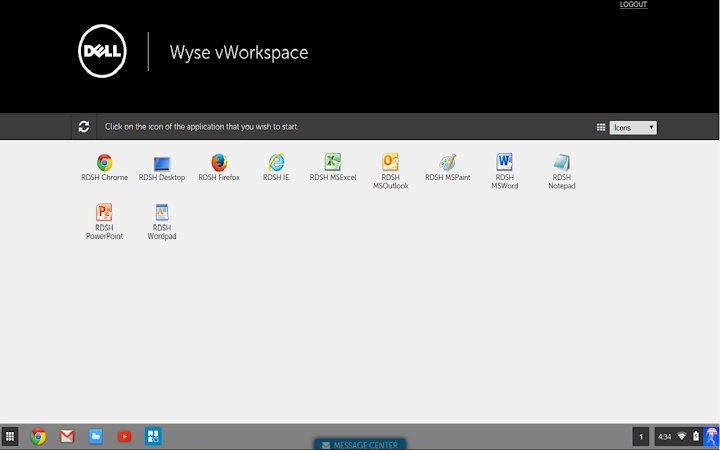
The Dell Wyse vWorkspace Connector for Chrome OS is designed with simplicity in mind, aligning with Chrome OS’s minimalistic interface philosophy. Users interact with the connector through a streamlined web-based portal, eliminating the need for complex installation or configuration steps. The workflow begins with launching the connector from the Chrome OS app launcher, followed by authentication and session initiation via the vWorkspace WebAccess interface.
Navigating between applications or desktops is intuitive, with a focus on fast connection times and responsive session handling. The user experience is optimized for low-latency environments, though specific performance metrics were not disclosed. The developer did not specify resource usage details, so actual CPU or RAM behavior remains unknown.
Stability is expected to be consistent given the connector’s lightweight nature and integration with a mature virtual desktop platform. However, performance may vary depending on network conditions and the underlying vWorkspace infrastructure. The software is designed to operate efficiently within the constraints of Chrome OS, ensuring reliable access without overwhelming system resources.
Compatibility & System Requirements
The Dell Wyse vWorkspace Connector for Chrome OS is designed exclusively for devices running Chrome OS. It is compatible with all Chromebook models that support the latest version of the operating system and can access web-based applications. The software version is 1.0, released on September 29, 2016, and has a file size of 1.4 MB.
Exact system requirements were not listed. Platform compatibility information is limited to Chrome OS. No additional hardware specifications or OS version details were provided. Users should ensure their Chromebook supports the vWorkspace WebAccess service and has a stable internet connection for optimal functionality.
Installation is handled through the Chrome Web Store or enterprise deployment channels. The lightweight footprint ensures it can be deployed across large device fleets without significant overhead.
Pros and Cons
Pros
- Enables access to Windows applications from Chrome OS devices
- Secure connection via NLA and vWorkspace WebAccess
- Lightweight at just 1.4 MB
- Designed for enterprise and educational environments
- Free to download and use
Cons
- No detailed system requirements provided
- Performance data not disclosed
- Release date is from 2016, indicating potential outdated support
- Dependent on external vWorkspace infrastructure
- Limited to Chrome OS platform
FAQ Section
Is the Dell Wyse vWorkspace Connector compatible with all Chromebooks?
The connector is designed for Chrome OS, but specific compatibility with individual Chromebook models was not detailed. Users should verify that their device supports the vWorkspace WebAccess service.
Is the software free to use?
Yes, the Dell Wyse vWorkspace Connector for Chrome OS is available at no cost.
Does the connector require an internet connection?
Yes, a stable internet connection is required to access remote Windows applications and desktops through the vWorkspace environment.
Can I use this tool offline?
No, the connector requires an active connection to the vWorkspace server and cannot function in offline mode.
Is the software secure?
Yes, the connector supports Network Level Authentication (NLA) and leverages the vWorkspace WebAccess platform, which is designed with enterprise-grade security protocols.
Final Thoughts + CTA
The Dell Wyse vWorkspace Connector for Chrome OS remains a practical solution for organizations seeking to extend Windows application access to Chromebook users. While released in 2016, its lightweight design and integration with vWorkspace WebAccess continue to offer value in hybrid IT environments. The free availability and focus on security make it a compelling choice for schools and businesses managing mixed device fleets.
However, users should be aware of the software’s age and the lack of updated system specifications. For those with existing vWorkspace infrastructure, it offers a straightforward path to remote access. The connector is best suited for IT administrators and enterprise users who need to support legacy Windows applications on modern, cloud-first devices.
Download Dell Wyse vWorkspace Connector for Chrome OS now to enable secure, efficient access to Windows environments from Chrome OS devices.







